Resume templates › Onyx
Onyx resume template
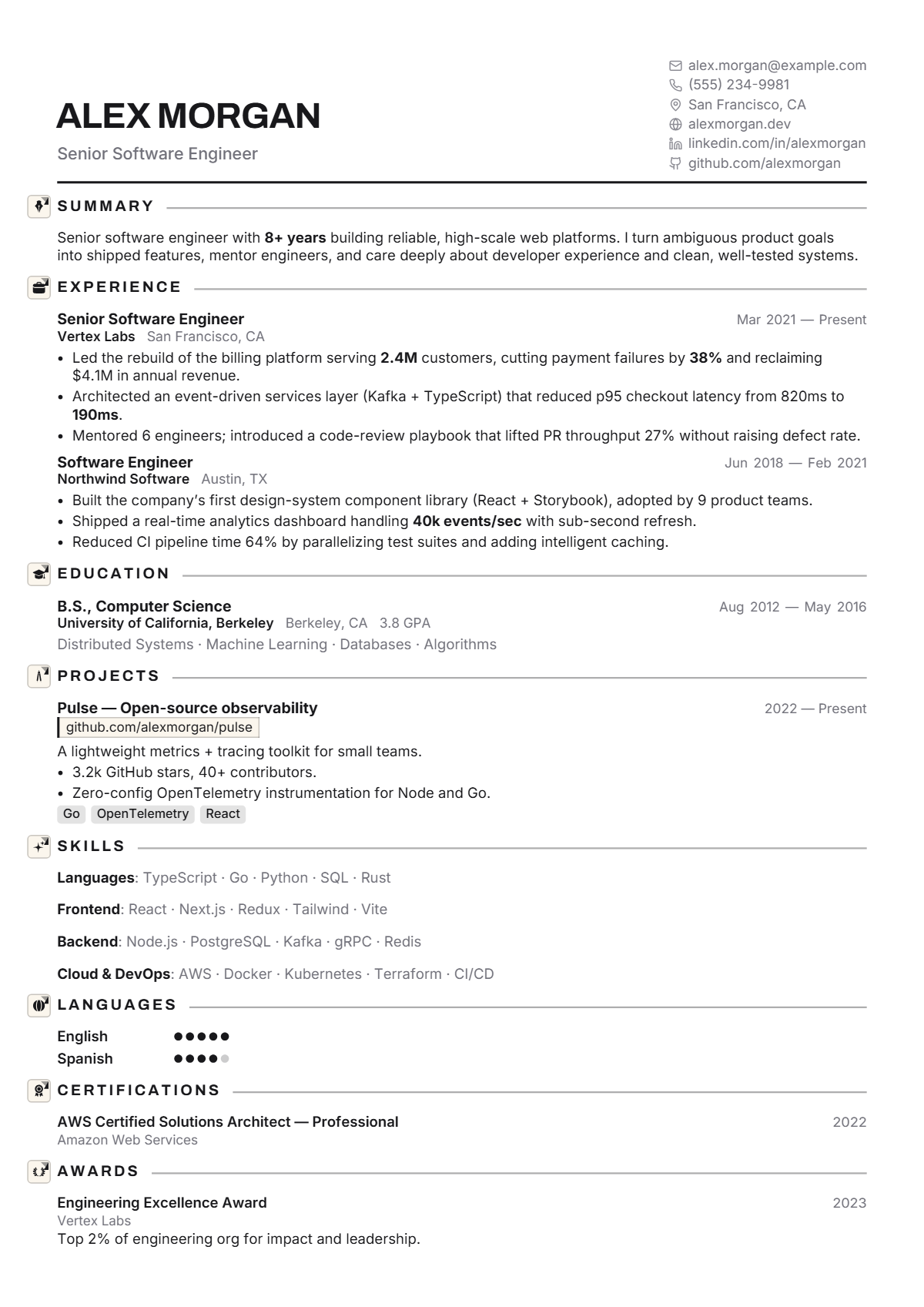
Monochrome and architectural. Quiet confidence in black and white.
Who the Onyx design suits
Onyx suits architects, product and UX designers, engineers, analysts and consultants who want a modern page with no colour at all. Black and white reads as decisive and prints identically on any printer, which makes it a good default for applications that may be photocopied, faxed or reviewed on paper.
How the page is laid out
Onyx uses a split header: the name in heavy Archivo capitals with a grey title below on the left, contact details stacked with icons on the right, and a solid black rule beneath. Headings are spaced black capitals beside an icon tile, followed by a thin grey line to the margin. Body text is Inter in one column, skills are inline lists with bold labels, and the only fills are grey project tags.
How it reads to an ATS
Onyx is a single column after the header, so experience, education and skills read in order. Contact details stacked on the right are plain text lines with decorative icons a parser skips. Because nothing depends on colour, the page stays legible on a greyscale print or a poor scan, which matters when a recruiter forwards a paper copy.
Best for: Single column · Minimal · Modern. Free to use, exports selectable text a résumé parser can read, and edits entirely in your browser — no account and no upload.
Not quite right? Switch to any of 75 templates in one click, even after you have filled it in: your content stays, nothing is retyped. Colours, fonts, photo, columns and section styles change just as easily.
Everything on this design can be changed
The picture is a starting point, not a fixed layout. Open the design and change any of this in the editor, with your own words on the page as you do; nothing needs retyping.
- Colours: the accent, heading, text, background and sidebar colours
- Fonts: heading, body and name typefaces, sizes, line height and letter spacing
- Header: photo or monogram on or off, the contact line’s style and whether it sits under, beside or above the name, or in the sidebar
- Section headings: rule, band, side heading and more, for every section at once or one at a time, with an optional icon
- Dates: at the right edge, before the entry, beside the title or in the company line
- Language levels, skill badges and link style
- One or two columns, the sidebar width, section order and which sections appear
- Spacing, margins and page size (A4 or US Letter), and Magic fit to keep it to one, two or three pages
- Switch to any of the other 74 designs at any time; your content comes with you
Start a résumé in this design · Browse all 75 resume templates · See 108 complete resume examples