Resume templates › Scholar
Scholar resume template
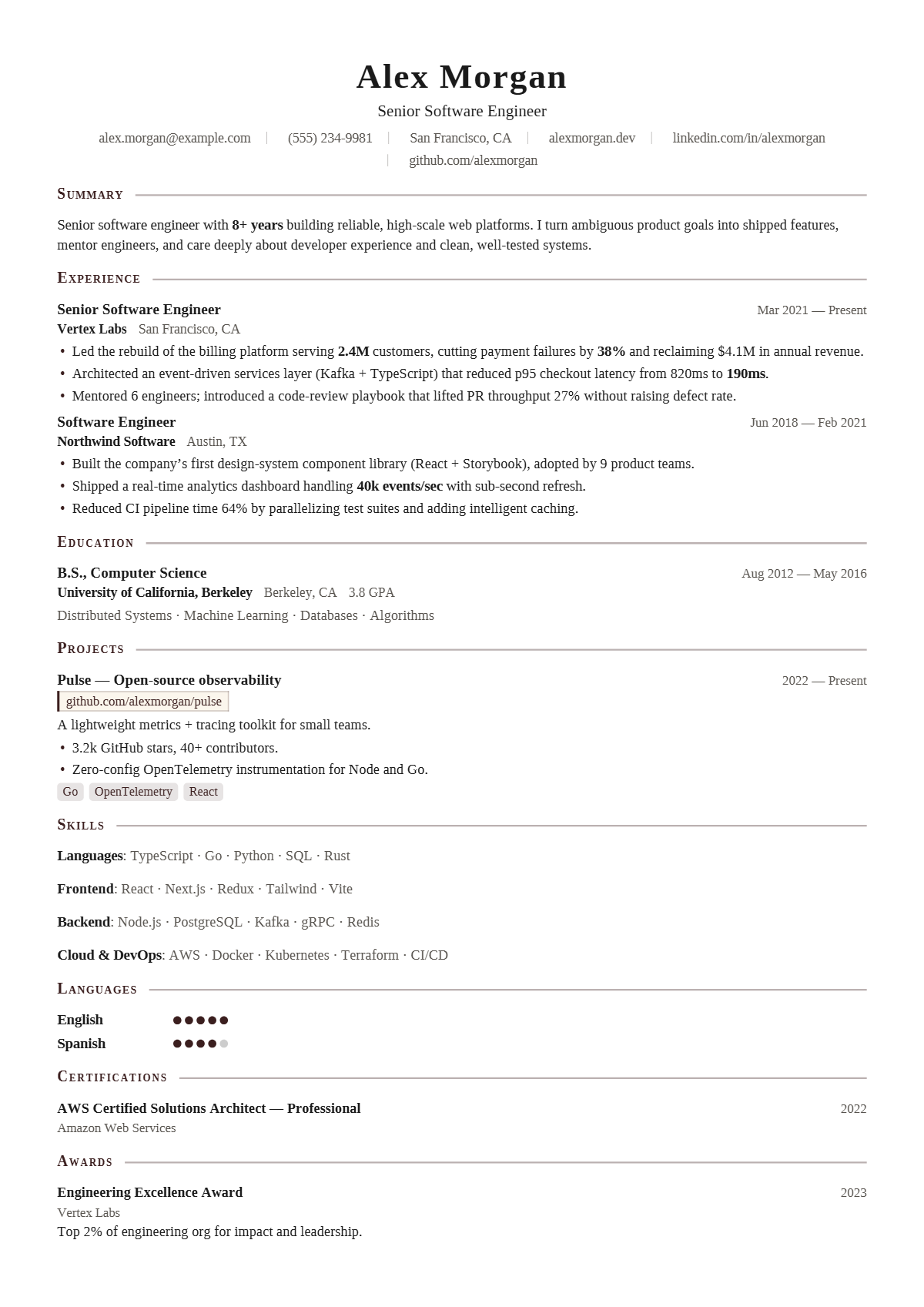
Academic, Times-set, single column. The gold standard for tradition.
Who the Scholar design suits
Scholar suits graduate school applicants, law students, finance and consulting candidates, and anyone applying where a traditional Times-style résumé is the norm, such as investment banking or government. It is as much at home for an undergraduate with one internship as for a partner-level professional. It will not help a designer show visual skill.
How the page is laid out
Scholar centres the name in a large, widely spaced serif, the title beneath and contact details in a row divided by thin vertical bars, with no icons. Section headings are small capitals in a deep brown-black, left-aligned, followed by a thin rule to the margin. Everything is set in Tinos, a serif with Times-compatible letter widths, in near-black; colour barely appears beyond the heading tone and language dots.
How it reads to an ATS
Scholar is about as safe as it gets for parsers: one column, a serif every system handles, no icons, standard headings and inline skills. The vertical bars in the contact row are separators, so each item reads as its own value. If a firm asks for a Times New Roman résumé, Tinos matches its letter widths, so line breaks and page length come out the same.
Best for: Single column · Classic. Free to use, exports selectable text a résumé parser can read, and edits entirely in your browser — no account and no upload.
Not quite right? Switch to any of 75 templates in one click, even after you have filled it in: your content stays, nothing is retyped. Colours, fonts, photo, columns and section styles change just as easily.
Everything on this design can be changed
The picture is a starting point, not a fixed layout. Open the design and change any of this in the editor, with your own words on the page as you do; nothing needs retyping.
- Colours: the accent, heading, text, background and sidebar colours
- Fonts: heading, body and name typefaces, sizes, line height and letter spacing
- Header: photo or monogram on or off, the contact line’s style and whether it sits under, beside or above the name, or in the sidebar
- Section headings: rule, band, side heading and more, for every section at once or one at a time, with an optional icon
- Dates: at the right edge, before the entry, beside the title or in the company line
- Language levels, skill badges and link style
- One or two columns, the sidebar width, section order and which sections appear
- Spacing, margins and page size (A4 or US Letter), and Magic fit to keep it to one, two or three pages
- Switch to any of the other 74 designs at any time; your content comes with you
Start a résumé in this design · Browse all 75 resume templates · See 108 complete resume examples